Social media scheduler
Overview
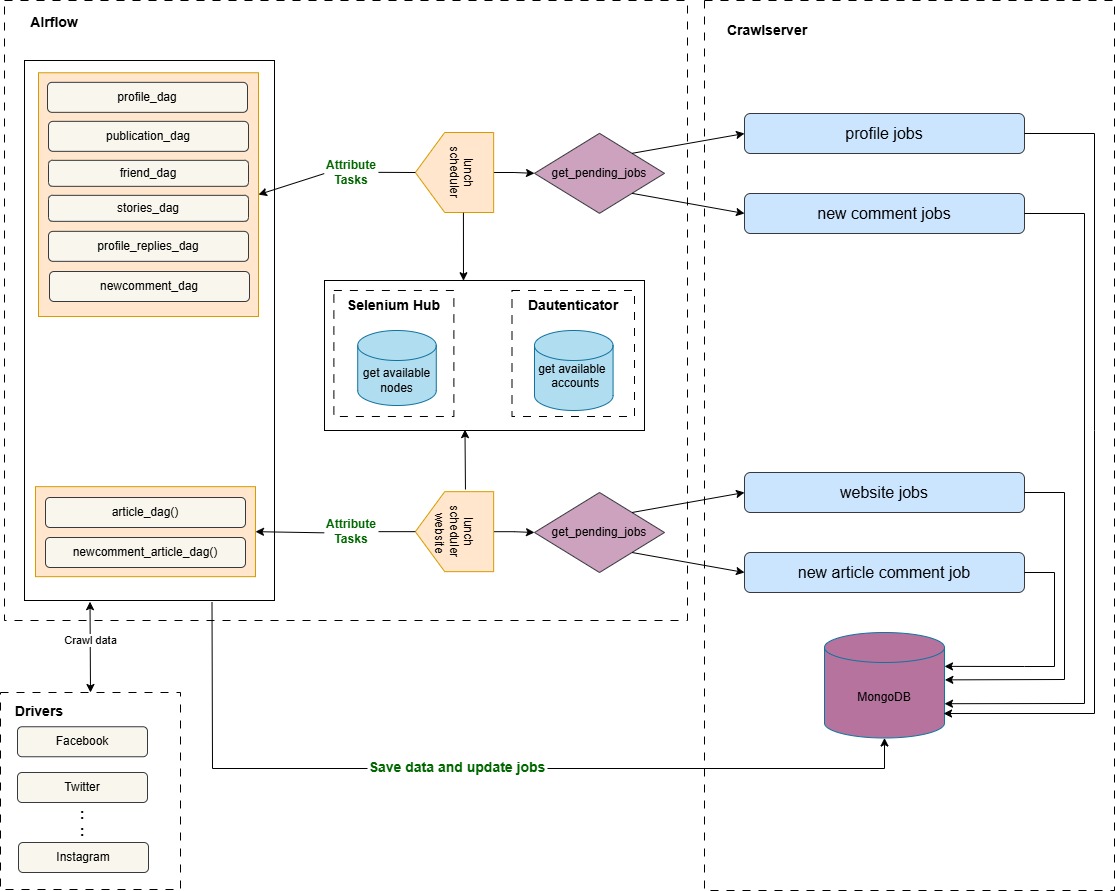
The SchedulerOperator is responsible for managing the scheduling of crawling tasks for social media profiles and websites. It retrieves pending jobs from a MongoDB database, categorizes them based on specific execution requirements, and triggers the appropriate DAGs to execute the tasks. Each Profile type (individuel, website) has different tasks, some requiring authentication, others requiring Selenium, or both.
Our system runs two separate schedulers:
- Profile Scheduler: Runs every 5 minutes to schedule crawling tasks for social media profiles.
- Website Scheduler: Runs every 15 minutes to schedule crawling tasks for websites.
The scheduler interacts with MongoDB (CrawlServer) to retrieve pending or failed jobs. Each job can have one of the following states:
1 - Pending (awaiting execution)
2 - Running (currently being processed)
3 - Failed (encountered an error)
Crawling Jobs
When a new profile is added to CrawlServer, at least two tasks are automatically scheduled. The following are the possible tasks:
- Profile: The first task to run, retrieves the profile's information
- Publication: Collects the profile's posts and comments
- Friend: Collects the profile’s followers and followings
- Profile Replies : Collect the profile's comments
- Stories: Retrieves the profile’s stories
When a new website is added to CrawlServer, at least one task is automatically scheduled. The following are the possible tasks:
- Article: ollects the website's posts and comments
- Comment: Collects the website's comments
Workflow
The SchedulerOperator follows the following steps :
1. Retrieving Model Identifiers
The operator queries the MongoDB database to fetch the IDs of models related to social media data (such as profile, publication, comment, friend, etc.). These model IDs are stored in a dictionary for later use in driver operators to associate the media with their source.
2. Retrieving Pending Jobs for Each Task
The scheduler loops through the collections dictionary, where:
- The keys represent the collection names containing jobs.
- The values contain a list of tasks associated with each collection.
For each task, pending jobs are grouped into four categories:
- Tasks requiring login only
- Tasks requiring Selenium only
- Tasks requiring both login and Selenium
- Tasks requiring neither login nor Selenium
If no pending jobs exist for a task, it is skipped.
3. Organizing Jobs into Batches per media name
The scheduler separates the results of the pipeline aggregation into four lists (one per category). Jobs are then grouped by media name and batched based on predefined limits.
4. Preparing Jobs for Execution
The operator processes each category separately:
- For tasks requiring authentication: The operator checks for an available account using the authentication hook (DAuthenticatorHook). If no valid account is found, the task execution is stopped.
- For tasks requiring Selenium: The operator checks for an available Selenium node to execute the task. If no node is available, execution is stopped.
- For jobs that do not require authentication or Selenium: These are processed and scheduled immediately.
- The job details including authentication credentials, if needed are packaged into a dictionnary that will be passed to crawling DAGs
5. Launching the DAGs
Once the jobs are prepared, the operator triggers the corresponding DAG for execution. The DAG name is determined based on the task name combined with "_dag" (e.g., profile_dag, publication_dag). If authentication was required, the operator also add the mapping between the DAG run and the account used in Dauthenticator.
Retrieving Pending Jobs
The get_pending_jobs_per_collection function is responsible for retrieving and categorizing pending jobs from a MongoDB collection. It applies an aggregation pipeline to filter, sort, and join relevant data from different collections before grouping jobs based on whether they require login, Selenium, both, or neither.
Steps in the Aggregation Pipeline
1. Filtering Pending Jobs
The pipeline starts by filtering jobs that meet the following criteria: The execution date is less than or equal to the current time The task is enabled (enabled: True) The job state is either pending or failed The task name should be equal to the task name passed as parameter
2. Sorting Jobs
The filtered jobs are sorted based on three criteria:
- human_validation: Prioritizing tasks that have already been validated by a human
- certitude: Giving priority to tasks with a higher probability to be the right profile
- modified_at: Ensuring older pending tasks are processed first
3. Joining Social Media Data
A $lookup operation is performed on the childs_socialmedia collection to fetch details about the social media platform related to each job The matching condition ensures that:
- The media_name field in the job matches the media_name in childs_socialmedia
- The social media is enabled (enabled: True)
The result is stored in the social_media field
4. Extracting Social Media Data
Since the lookup creates an array, $unwind is used to extract the first matched document, simplifying the structure
5. Joining Task-Specific Data
Another $lookup is performed on the core_tasks collection to fetch metadata about the task The matching condition ensures that:
- The media_name_id from childs_socialmedia matches the media_name_id in core_tasks
- The task name matches the requested task
The result is stored in the task_data field
6. Extracting Task-Specific Data
Similar to the previous step, $unwind is used to extract the first matched task document.
7. Flattening the Document Structure
The pipeline moves key fields from social_media and task_data to the top level using $addFields, making them directly accessible in the final output Extracted fields include:
- driver_class: The social media driver responsible for handling the task.
- media_id: Unique identifier for the social media entity.
- used_tool: The tool associated with the social media platform.
- need_selenium: Boolean flag indicating whether the task requires Selenium.
- need_login: Boolean flag indicating whether authentication is needed.
- crawl_limit: The maximum number of items to be crawled per execution.
8. Removing Unnecessary Fields
The project stage is used to exclude task_data and social_media from the final result since their relevant information has already been extracted.
9. Grouping Jobs by Execution Requirements
The jobs are grouped into four categories based on their authentication and Selenium needs:
- need_only_login: Requires authentication but not Selenium
- need_only_selenium: Requires Selenium but not authentication
- need_selenium_and_login: Requires both Selenium and authentication
- without_selenium_and_login: Requires neither Selenium nor authentication The $group stage iterates over jobs and assigns them to the correct category using $cond conditions
10. Returning the Categorized Jobs
The final project stage ensures that only the grouped job categories are included in the final output, removing unnecessary metadata fields like _id. The result is returned as a dictionary containing job lists categorized in 4 categories